01
Lead Management
Capture inbound inquiries, assign owners quickly, and keep every lead source visible from day one.
CRM for sales and telecalling execution
Capture leads, manage telecalling follow-ups, log call outcomes, and keep every pipeline stage visible with a CRM designed for practical day-to-day execution.
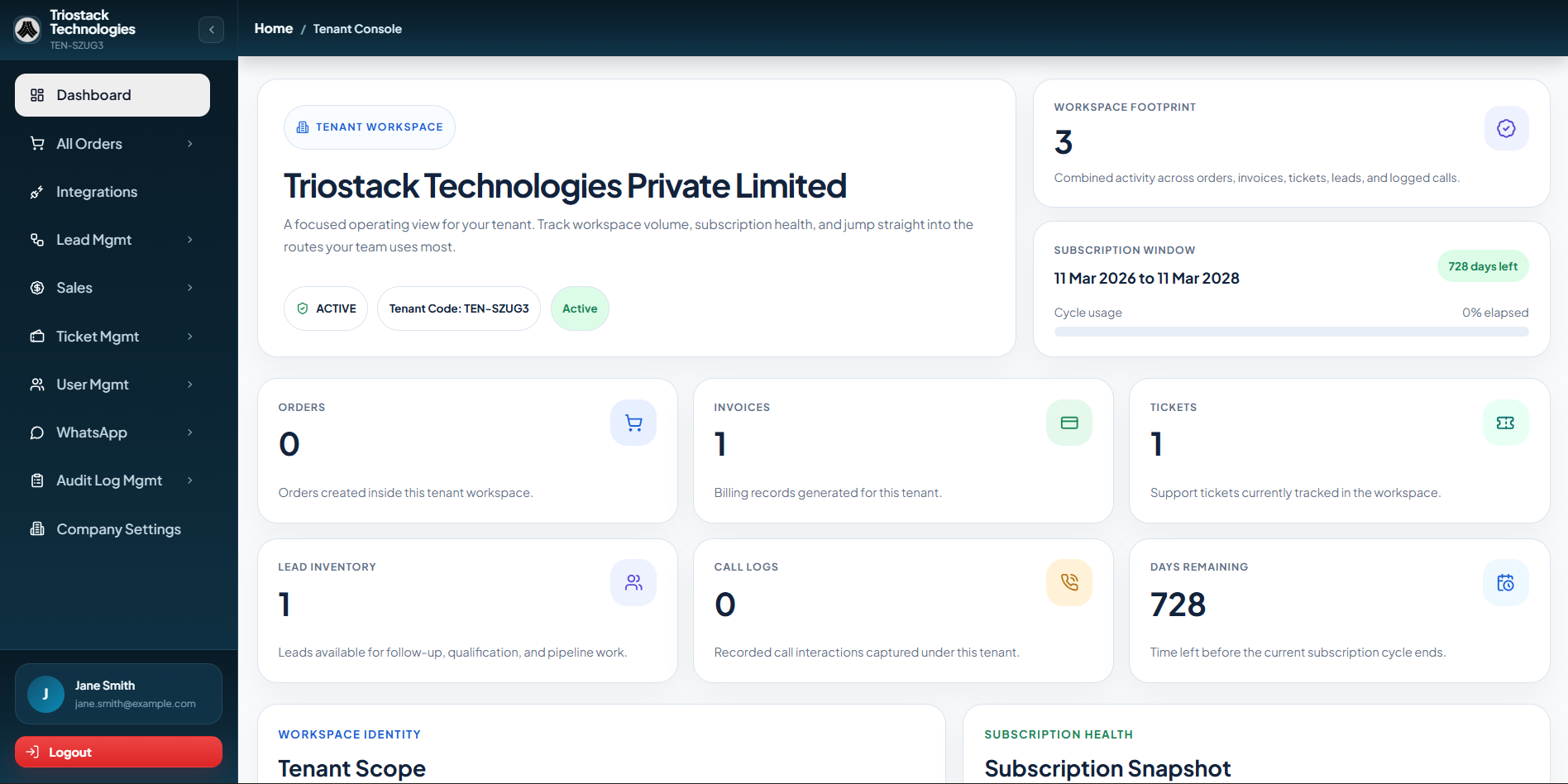
Key Features
Aarohan CRM brings the daily sales and telecalling workflow into one practical operating layer, without cluttered screens or unnecessary complexity.

Capture inbound inquiries, assign owners quickly, and keep every lead source visible from day one.
Track call queues, dispositions, and next actions clearly so teams know what is progressing, delayed, or ready to close.
Maintain one working view of profiles, notes, calls, and customer history across the account.
Monitor value, probability, next step, and expected close dates across active opportunities.
Trigger reminders, assignments, and telecalling follow-up actions automatically to reduce manual chasing.
Keep sales, telecalling, operations, and managers aligned with shared visibility into updates and handoffs.
Connect customer messaging to CRM workflows for faster responses and cleaner conversation records.
Review pipeline health, call activity, rep performance, and conversion trends through practical daily reporting.
CRM Workflow
Aarohan CRM helps teams move from first enquiry to telecalling, follow-up, and conversion with a workflow that feels structured without becoming heavy.

Capture new enquiries from campaigns, referrals, forms, and incoming conversations.

Run structured call attempts with clear ownership, call outcomes, and next action on every lead.

Keep reminders, messages, and pending actions visible so momentum does not slow down after each call or response.

Turn the right opportunities into customers with a workflow that stays consistent to the end.

Score and prioritize the right leads before they enter the active telecalling and sales pipeline.

Make responsibilities clear across telecallers, reps, managers, and support teams.

Reduce missed call-backs and follow-ups with task prompts and recurring action triggers.

Keep notes, calls, and customer messaging tied to the same CRM record.

Review movement across leads, deals, follow-ups, and conversion outcomes.

Move accounts between sales, onboarding, and support without context loss.
Automation Features
This layer is built for sales and telecalling teams that want speed and consistency, while keeping ownership, context, and customer timing visible.


Route new enquiries to the right salesperson by source, geography, product line, or deal priority the moment they enter the CRM.
Instant routing
Trigger timely nudges for calls, messages, and pending quotes so promising conversations do not go cold between telecalling stages.
Daily rhythm
Move repetitive admin into background rules that update stages, create tasks, and log the next action automatically.
Less manual work
Spot stalled deals and missed callbacks quickly with idle-time alerts that surface opportunities needing a push before momentum disappears.
No silent pipeline
Pass discount requests, special pricing, and exception cases to the right manager without losing context or response speed.
Cleaner approvals
Notify teams when opportunities change stage so sales, operations, and leadership stay aligned without manual follow-through.
Shared visibility
CRM Integrations
Aarohan CRM sits in the middle of the workflow, so your team can work from one operational view across telecalling, sales, and customer channels instead of stitching updates together manually.

Bring chats, lead capture, and follow-up context directly into the CRM.

Track replies, outreach history, and customer intent without jumping across tools.

Connect collections and transaction signals to deals that are ready to close.

Pull campaign conversations and ad-driven enquiries into the same sales flow.

Sync forms, lead sources, and demand coming from search and workspace tools.

Capture web enquiries and route them instantly into sales-ready CRM records.
Bring chats, lead capture, and follow-up context directly into the CRM.
Track replies, outreach history, and customer intent without jumping across tools.
Connect collections and transaction signals to deals that are ready to close.
Pull campaign conversations and ad-driven enquiries into the same sales flow.
Sync forms, lead sources, and demand coming from search and workspace tools.
Capture web enquiries and route them instantly into sales-ready CRM records.
Built For Real Operations
From telecalling activity and WhatsApp to email, website forms, Meta campaigns, Google demand, and payment touchpoints, the CRM stays connected to how enquiries actually move in the business.
Industries
Use one Aarohan CRM setup across real estate, education, healthcare, retail, hospitality, and other response-heavy industries with tailored follow-up content for each workflow.

Open any industry to see a dedicated page with challenges, workflows, benefits, and a conversion-focused CTA built on the same layout.
Education & Edtech
Handle counseling inquiries, admission follow-ups, and enrollment nudges without losing parent or student context.
Banking & Fintech
Respond to application interest, document requests, and sales callbacks with secure, trackable workflows.
Healthcare
Coordinate patient inquiries, appointment reminders, and follow-up communication without fragmented handoffs.
Events & Webinar
Manage registrations, reminders, attendance nudges, and post-event conversion in one coordinated workflow.
Ecommerce
Recover abandoned carts, handle product questions, and keep order-related follow-ups moving from one workflow.
Real Estate
Convert property inquiries into site visits, callback-ready leads, and booking conversations with full pipeline visibility.
IT Services & Internet
Qualify service inquiries, schedule discovery calls, and keep proposal follow-ups structured across B2B sales cycles.
Offline & Retail
Connect store inquiries, promotions, and repeat-purchase nudges so walk-in and digital demand sit in one flow.
HR & Recruitment
Manage candidate intake, interview reminders, and recruiter follow-up with better stage visibility.
Restaurants & Food Delivery
Coordinate table bookings, catering inquiries, repeat orders, and customer updates from a single follow-up system.
Gym & Fitness Centers
Handle membership inquiries, trial bookings, and renewal reminders with cleaner front-desk follow-up.
Spas & Salons
Coordinate appointment requests, service reminders, and repeat bookings without relying on manual calling.
Automobile
Track showroom inquiries, test-drive requests, and service follow-ups through one customer pipeline.
Travel & Tourism
Manage itinerary inquiries, booking reminders, and traveler updates with better operational control.
Government
Manage citizen inquiries, appointment requests, and follow-up communication with clearer service tracking.
Manufacturing
Track distributor inquiries, sales callbacks, and service requests across complex operational handoffs.
Logistics & Supply Chain
Handle shipment inquiries, service requests, and account follow-ups with better response ownership.
Hospitality & Hotels
Convert room inquiries, group bookings, and guest follow-ups with better reservation visibility.
Insurance
Manage policy inquiries, renewal reminders, and advisor callbacks through one structured sales process.
Legal Services
Track client intake, consultation scheduling, and matter follow-up through a structured service workflow.
NGOs & Nonprofits
Coordinate donor inquiries, volunteer outreach, and beneficiary communication with stronger process visibility.
Telecom
Handle plan inquiries, service requests, and renewal reminders with better sales and support alignment.
Media & Publishing
Track advertiser inquiries, subscriber engagement, and event-led leads through one response workflow.
Professional Services
Manage inquiry intake, consultation scheduling, and proposal follow-up for high-trust service sales.
Pricing
1. Quarterly is the base plan. Semi-Annual and Annual reduce the effective monthly price for longer billing cycles.
2. Onboarding and support can be tailored for larger CRM and telecalling rollouts.
Testimonials
A more testimonial-led view of Aarohan: real people, real roles, and the operational improvements they noticed after bringing conversations and follow-ups into one flow.
Priya S.
Admissions Lead, Edtech Brand
“Aarohan helped us centralize every lead inquiry and respond on WhatsApp much faster. Our admissions team now spends more time converting instead of manually tracking follow-ups.”
Rohit M.
Growth Manager, Real Estate Firm
“The CRM visibility and automation sequences made a noticeable difference in how our sales team handled warm leads. We stopped losing momentum between first response and closure.”
Neha A.
Operations Head, Wellness Business
“We use Aarohan to manage inquiries, reminders, and campaign communication in one system. It feels operationally clean, and customers get quicker responses without the process feeling robotic.”
Priya S.
Admissions Lead, Edtech Brand
“Aarohan helped us centralize every lead inquiry and respond on WhatsApp much faster. Our admissions team now spends more time converting instead of manually tracking follow-ups.”
Rohit M.
Growth Manager, Real Estate Firm
“The CRM visibility and automation sequences made a noticeable difference in how our sales team handled warm leads. We stopped losing momentum between first response and closure.”
Neha A.
Operations Head, Wellness Business
“We use Aarohan to manage inquiries, reminders, and campaign communication in one system. It feels operationally clean, and customers get quicker responses without the process feeling robotic.”
Karan V.
Business Head, Service Company
“What changed for us was consistency. Aarohan made sure every lead got a timely response, and our internal team finally had a reliable process to work from.”
Aisha R.
Customer Success Lead, Healthcare Brand
“We finally had a single view of conversations, reminders, and next actions. That clarity improved both response speed and accountability across the team.”
Manav T.
Marketing Head, Events Company
“Aarohan gave our marketing and sales teams better coordination. Leads were warmer by the time someone spoke to them, and follow-ups were no longer missed.”
Karan V.
Business Head, Service Company
“What changed for us was consistency. Aarohan made sure every lead got a timely response, and our internal team finally had a reliable process to work from.”
Aisha R.
Customer Success Lead, Healthcare Brand
“We finally had a single view of conversations, reminders, and next actions. That clarity improved both response speed and accountability across the team.”
Manav T.
Marketing Head, Events Company
“Aarohan gave our marketing and sales teams better coordination. Leads were warmer by the time someone spoke to them, and follow-ups were no longer missed.”
CTA
Start with a setup your team can adopt quickly, then connect telecalling, follow-ups, integrations, and reporting without losing day-to-day clarity.
Setup
Guided CRM launch for your team.
Channels
Leads, calls, and follow-ups aligned in one flow.
Visibility
Clear call and pipeline movement from day one.
FAQ
Practical answers for teams evaluating rollout speed, telecalling fit, integrations, automation, and pricing.
Most teams can start with lead capture, telecalling workflow, pipeline stages, and follow-up tracking in a short implementation cycle. The rollout depends on your fields, workflow rules, and integrations.
Yes. It can structure telecalling queues, call outcomes, callbacks, ownership, and follow-up discipline alongside the main sales pipeline.
Yes. Leads can be routed by source, geography, product line, or internal ownership rules so teams do not need to assign each enquiry manually.
Yes. The CRM is designed to connect key communication and acquisition channels including WhatsApp, email, website forms, Meta, Google, and other API-based workflows.
Yes. It works for smaller teams that need daily discipline as well as growing teams that need stronger visibility, automation, and structured handoffs.
Yes. For broader rollouts, custom integrations, or more complex approval and reporting requirements, pricing and onboarding can be shaped around your setup.